


There are different between two Motorola DROID XYBOARD i.e. Motorola XYBOARD (US) and DROID XYBOARD (Verizon):
Motorola XYBOARD (US)
- Wi-Fi only (No Sim support or Cell data)
- Supported storage: 16GB and 32GB
- Accys: Charger, Cable
- Model number: MZ607
- No External MicroSD support
DROID XYBOARD (Verizon)
- Verizon 4G LTE device (Micro SIM supported)
- Supported storage: 16Gb and 32GB
- Accys: Charger, Cable
- Model number: MZ609
- No External MicroSD support
Motorola DROID XYBOARD 8.2 won’t support below application pre installed and these are application exclusive to Verizon DROID XYBOARD:
• Blockbuster
• Slingbox
• VideoSurf
Tips for Factory Reset
Factory Data Reset is utilized for delete or removes data, content and installed added application on the device. The Factory Reset will remove everything from your device.
Note: while using this feature your all data and application will get removed along with the Dungeon Defenders and some pre-loaded music, so before performing Factory Reset you should take backup of your device.
How to perform Factory Reset
- From the home screen, touch Apps
- Tap Settings
- Tap Privacy
- Tap Factory data reset
- Tap Reset tablet and go through the onscreen instructions
How to perform Factory Reset Using External Keys:
There are two methods to Factory Reset one is said above and second one through external keys:
- First of all Turn off tablet.
- Now turn on the tablet with power button and wait for the 2 seconds and when you get red Motorola logo press and hold the down and up Volume key
- While doing you will get the Android Recovery on top of the screen and after that release volume key;
- Now press volume up button and you will get Entering Android recovery mode message and then few seconds later an Android robot graphic will show alone on the screen and then release key.
- Now press and hold down the power button and along with press the volume up key to view the Android Recovery screen menu.
- On Android Recovery screen menu select Wipe data/factory reset using volume up/down key
- Scroll down to select “Yes, delete all user data”.
- You should tap the power button to choose the options.
- Once you finish performing Factory Reset You will return back to the Android recovery screen menu.
Tips for Charging
The DROID XYBOARD 8.2 comes with the micro-USB connector like other phones although DROID XYBOARD 8.2 require more power compare to other stranded Smartphone. If you’re plugged in DROID XYBOARD 8.2, that doesn’t powerful enough. While charging you may see triangle icon near the time on the bottom right of the screen. Just tap on the icon and you get alert saying that:” “slow charge” mode and that means your battery may still be draining on slow charge mode.
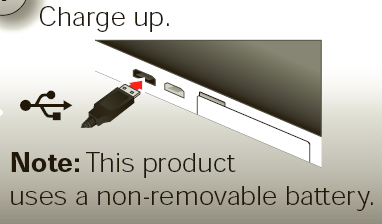
How to charge the DROID XYBOARD 8.2?
Note: i would like to suggest you to use charger which comes with tablet to charge your device. If you use any other charger to charge DROID XYBOARD 8.2, charge will take long time and along with this you will get any notification similar to below picture:
First plug-in charger into the charger port at bottom of tablet and plug-in charger to electrical outlet:
When the device is powered off and the battery charger is inserted, the tablet will automatically power on.


 Reply With Quote

Bookmarks