|
| ||||||||||
| Tags: apple, apple iphone, contacts group manager, grouper app, groups app, how to, iphone 4, itunes |
![]() |
| | Thread Tools | Search this Thread |
|
#1
| |||
| |||
| How to make different categories of Contacts in iPhone
|
|
#2
| |||
| |||
| Re: How to make different categories of Contacts in iPhone
Yes it is absolutely possible to create different group/category of contacts and add/remove contacts in them using Apple iPhone 4. The easiest way to add/create or delete a contact groups from iPhone mobile is to use an Address Book application which can edit and change the contact informations and groups.
|
|
#3
| |||
| |||
| Re: How to make different categories of Contacts in iPhone
I have been using Contacts Group Manager app in my Apple iPhone from last so many months to manage my iPhone contacts. It provides a very good Group Management function which makes it easier and faster to use. You just have to create a group and keep checking (a tick mark) your contacts which you wish to place under the following group. Any numbers of Contacts can be added to/removed from the group by just one check mark (tick mark). It performs very well with even 1000 contacts. You can even send mails to the group members at the same time. |
|
#4
| |||
| |||
| Re: How to make different categories of Contacts in iPhone
After searching for apps on Internet which can solve this issue efficiently I was able to find one which is very cheap to purchase but the functionality of the app is amazing. It will cost you just 0.99 cent to purchase the “Grouper” app from iTunes store. It works great with the iPhone and integrates itself with the existing address book in your iPhone. The “Grouper” app does not restricts the user with a specific number of groups, thus making it possible to make as many groups as the user wants, but it depend on the available space. |
|
#5
| |||
| |||
| Re: How to make different categories of Contacts in iPhone
Mostly all the apps which help you to organize your contacts and groups in your apple iPhone mobile are paid applications. So if you want to try, I would recommend you to use Groups app, which is a free application. You can search about it on Internet and download it from there or the official website of Apple. You just need to download the Groups app in your computer/laptop and connect your iPhone to your computer using a USB cable. If you have installed iTunes application in your system, then it will automatically put the Groups app on the connected iPhone. On disconnecting your iPhone from the computer, just click on Groups and you will find a free icon of Groups in your iPhone home screen. Launch the application and click on “Edit” and then on “Add New Group” to create a new group. Follow the on-screen instruction and finish the process and finally click on “Done” to add your desired contacts to groups which you have choosed. |
|
#6
| |||
| |||
| Re: How to make different categories of Contacts in iPhone
Those replies were very helpful. I am impressed with the quick service of replying so quickly to the query. All thanks to you, now I am able to manage my contacts in different Groups, thus making it less hectic and time consuming for me to search for one particular contact in the long list of original contact list which I was having before taking your help. Once again thanks a lot. I would definitely try those apps mentioned above and keep the one which is suitable to my requirements. |
|
#7
| |||
| |||
| Re: How to make different categories of Contacts in iPhone
Hi, I am proposing a free application to create groups of contacts, directly on your iPhone. You will also be able to send group texts / emails, without selecting all group members one by one. You can test it here : group your iPhone contacts Rémi Note: As I am Easy Group developper, I may receive some form of compensation, financial or otherwise,from my recommendation or link. |
|
#8
| |||
| |||
|
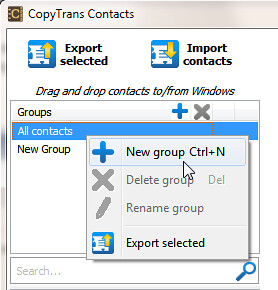
I was able to organize my iPhone contacts into groups directly within the default Contacts app on my iPhone via using a small tool called CopyTrans Contacts. ![]() It worked pretty straight-forward. |
|
#9
| |||
| |||
| Re: How to make different categories of Contacts in iPhone
If you are using the Mac’s “Address Book” app you can easily manage your groups and then sync with your iPhone Contacts app. See the Address Book Help for info on how to setup and manage your groups. Go to iTunes and, after connecting your iPhone, select your iPhone under devices in the left hand column and then select “Info” from the tabs at the top to set up Address Book Contacts syncing options. You can also sync with Yahoo and Google address books there. |
![]() |
|
| Thread Tools | Search this Thread |
| |
Similar Threads for: "How to make different categories of Contacts in iPhone" | ||||
| Thread | Thread Starter | Forum | Replies | Last Post |
| how do I transfer contacts etc from iPhone 3g to iTunes for new iPhone 4gs | thefishingbear | Portable Devices | 1 | 05-03-2012 10:56 AM |
| How to Copy Paste the SAME five sub-categories into 600 categories on Microsoft Office Project 2003? Please help it will take me forever doing each one on its own. | nicolasseifert | Windows Software | 1 | 06-07-2010 11:50 PM |
| Make Undelete MSN Contacts......... | Sheenas | Windows Software | 3 | 01-12-2009 08:27 AM |
| Photo Phonebook: Snyc Facebook contacts with iphone contacts | blindsleeper | Portable Devices | 2 | 10-11-2009 11:44 AM |
| Apple 3G iPhone has won 4 categories in British Technology Awards 2008 | Matellis | Portable Devices | 0 | 10-10-2008 02:18 PM |